Black Notepad Templates: Your Foundation for Publishing Projects
For many creators, the blank page is a powerful opportunity—and a daunting obstacle. Whether you’re planning a personal journal, designing a professional workbook, or preparing a book for Amazon KDP, starting with a solid, versatile template can transform your process. Black Notepad Templates offer precisely that: a collection of 100 ready-to-use interiors designed to serve as the foundational structure for a wide range of publishing and creative endeavors.
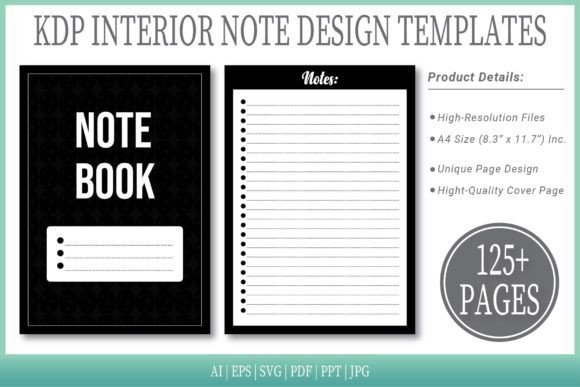
In essence, these templates are pre-formatted digital documents. They provide a clean, consistent layout—the “black notepad” aesthetic—that you can adapt and fill with your own content. The core value lies in removing the technical friction of page design, sizing, and file preparation, allowing you to focus entirely on writing, illustrating, or compiling your material.
What Makes These Templates So Practical?
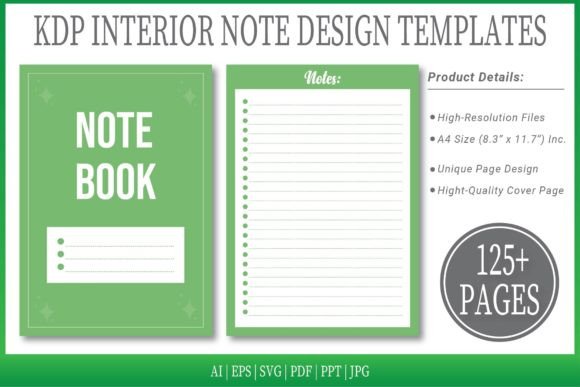
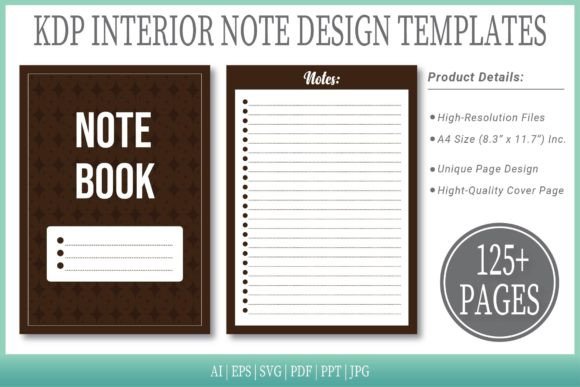
The bundle is specifically engineered for usability and flexibility. Each template is crafted to the standard A4 size (8.3" x 11.7" inches), which is a common and preferred dimension for many print and digital publications. A crucial feature is the no-bleed design, meaning the content is safely contained within the page margins, simplifying the printing process and making these templates ideal for projects where full-color edge-to-edge printing isn't required.
You receive 125 pages of template designs across 6 different file formats: AI, EPS, SVG, PDF, PPT, and JPG. This multi-format approach is a significant advantage. The editable AI and EPS source files allow designers and advanced users to modify every element using vector-based software like Adobe Illustrator. The PDF files are ready for immediate upload to platforms like Amazon KDP. Meanwhile, the PPT, SVG, and JPG formats offer accessibility for users who might work with presentation software or simpler image editors.
Having these formats at your disposal means you can choose the tool that best fits your skill level and workflow. A beginner might start with the PDF, simply adding text, while a professional designer can open the AI file to customize graphics and layouts extensively.
Real-World Uses for Creators and Entrepreneurs
Imagine you are a blogger wanting to compile your best articles into a physical booklet for your audience. Instead of wrestling with page setup in a word processor, you can open a Black Notepad Template PDF, paste your content, and have a professionally aligned document ready in minutes.
An educator creating a supplemental workbook for a course can use the PPT versions to easily arrange exercises and notes in a familiar slide format, then export to PDF for distribution. Freelancers and small business owners often need branded notebooks or proposal templates; the editable vector files let them insert their logo and adjust color schemes to match their brand identity perfectly.
Supporting KDP Publishing Goals
A primary application is supporting self-publishing authors on Amazon Kindle Direct Publishing (KDP). The mention that the interiors are “ready for upload” addresses a common hurdle for new publishers. KDP requires specific file specifications, and preparing a manuscript to meet these can be technically confusing. These templates act as a verified starting point. You can write your book directly into the provided PDF or, if you want a unique typographic style, use the AI file to set your own fonts and spacing, confident that the underlying page size and structure are already compliant.
The inclusion of an extra cover page template adds further value. While the interiors handle the body of the work, having a complementary cover design starting point helps maintain a cohesive visual style across your entire publication.
For hobbyists crafting personal projects like family history albums, recipe collections, or travel logs, the simple, elegant notepad layout provides a timeless backdrop that keeps the focus on your personal content without distracting graphic elements.
Important Considerations Before You Begin
While Black Notepad Templates are designed to be accessible, it’s wise to assess your own needs and tools. Consider which software you are comfortable with. If you do not have access to Adobe Illustrator, the AI and EPS files might be less useful for deep editing, but you could still utilize the PDF, JPG, or PPT options. The templates are a foundation, not a finished product; your own content quality and design choices will determine the final outcome.
Also, understand the “no bleed” specification. If your project requires photographs or backgrounds that extend to the very edge of the page (full bleed), you would need to adjust these templates or seek a bleed-specific alternative. For text-heavy books, journals, workbooks, and most standard publications, however, no-bleed is perfectly suitable and often easier to manage.
The bundle’s strength is its volume and variety—100 different templates. This means you can experiment with different layout feels for different chapters or projects without starting from absolute zero each time. It encourages iteration and creative exploration.
Streamlining Your Creative Process
Ultimately, products like Black Notepad Templates serve a fundamental need: they reduce the overhead of creation. For busy professionals, entrepreneurs, and passionate hobbyists, time spent on formatting is time taken away from developing ideas, writing content, or connecting with an audience. These templates offer a shortcut that maintains quality.
By providing high-resolution, multi-format files, they accommodate a spectrum of users from the casual to the expert. Whether you are publishing your first KDP book, designing a client presentation, or making a personal keepsake, having a reliable, adaptable template set can provide the confidence to move from idea to finished project more swiftly and with greater focus on what matters most—your own unique content.
The digital creator landscape is ever-evolving, and tools that empower rather than complicate are invaluable. A well-structured template acts not as a constraint, but as a launchpad, giving you a clear space—your own “black notepad”—to fill with your words, your designs, and your vision.