The Modern Creator's Toolkit: Digital Interior Templates Explained
In the realm of digital creation, especially for those publishing physical or digital books, the foundation of a professional product often lies in its interior design. While cover art captures attention, the interior layout dictates readability, usability, and overall user experience. For independent authors, educators, and content creators, achieving a polished interior without extensive design expertise or budget can be a significant hurdle. This is where pre-designed interior templates, such as the Pinkish Brown Notepad Templates collection, become an indispensable part of the workflow.
What Are Digital Interior Templates?
Digital interior templates are complete, pre-formatted document frameworks. They provide a structured layout for pages, including consistent margins, font styles, heading hierarchies, and page element placements. A collection like the Pinkish Brown Notepad Templates offers a specific aesthetic—a warm, approachable notepad style with a pinkish-brown thematic color scheme—packaged into a ready-to-use format. These are not merely static images but editable source files, allowing creators to infuse their content into a professionally designed shell.
The key value lies in their multi-format availability. A robust package typically includes vector files for deep editing, universal PDFs for immediate use, and sometimes presentation or image formats for versatility. This transforms a template from a fixed design into a flexible toolkit.
Core Components of a Comprehensive Template Package
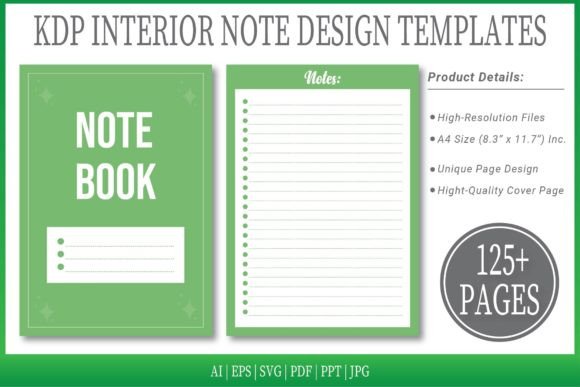
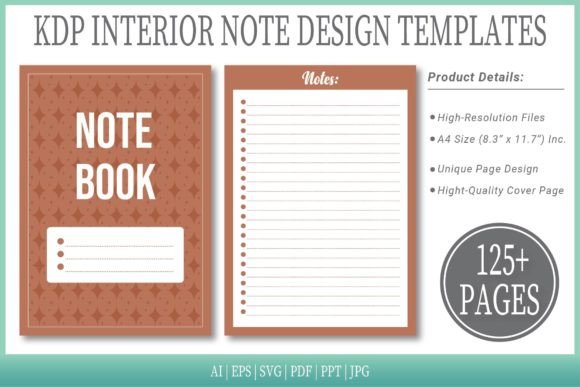
Examining a typical offering sheds light on what creators should seek. A package often includes a high-resolution PDF interior, already formatted to standard publishing sizes like A4. This PDF is frequently ready for direct upload to platforms such as Amazon Kindle Direct Publishing. Beyond the output file, the inclusion of editable source files in formats like AI and EPS is critical. These vector files allow alterations to colors, shapes, and elements using design software, making the template adaptable rather than restrictive.
Additional formats like SVG, PPT, and JPG extend utility. SVG files are useful for web integration or scalable graphics, PPT versions can be repurposed for presentations, and JPGs offer quick visual reference. The inclusion of a substantial number of pages, for instance 125 pages, provides ample material for long documents without repetitive manual layout work. An extra cover page inclusion further rounds out the offering, providing a cohesive look from cover to interior.
Primary User Groups and Practical Applications
The audience for such tools is broad, reflecting the democratization of publishing and content creation.
- Independent Authors and Self-Publishers: This group benefits immensely. Using a Pinkish Brown Notepad Templates style interior, an author can ensure their manuscript meets technical specifications for print or ebook while possessing a unique, visually pleasant layout. The editable files allow for minor tweaks to align with book genre or tone.
- Educators and Course Creators: Workbooks, lesson plans, and handouts require clear, organized pages. A notepad-style template evokes a familiar, educational feel, making materials more engaging. The multi-format nature means the same design can be used for printable PDF workbooks and presentation slides derived from the PPT files.
- Small Business Owners and Professionals: For creating client journals, branded note packs, internal process documentation, or proposal templates, these interiors offer a quick path to branded, professional documents without a full design commission.
- Hobbyists and Community Organizers: Planning guides, club newsletters, or personal project logs gain structure and polish. The accessibility of simply adding text to a ready-made layout lowers the barrier to creating something special.
Real-World Implementation: A Scenario
Consider a life coach compiling a guided journal for clients. They select the Pinkish Brown Notepad Templates for its warm, encouraging aesthetic. They download the package, open the editable AI file in Illustrator, and adjust a few accent colors to match their brand palette. They then populate the 125-page PDF with their prompts, exercises, and sections, using the pre-defined headings and page flows. Within a day, they have a professionally designed journal interior ready for KDP upload or local print, a task that might otherwise take weeks and significant cost.
Advantages of Using a Multi-Format Template System
The decision to use a comprehensive template system over a single-format file or starting from a blank page carries several distinct advantages.
- Time and Resource Efficiency: The most evident benefit is drastic time savings. Layout design, particularly for long documents, is meticulous work. A template eliminates this foundational step, allowing the creator to focus solely on content.
- Ensured Technical Compliance: For publishing platforms like KDP, specifications for margins, bleed, and page size are strict. Templates like these are designed to comply, reducing the risk of upload errors or print mishaps.
- Design Consistency: Manual formatting often leads to subtle inconsistencies in spacing, font sizes, or alignment. A template enforces uniformity across all pages, resulting in a more professional and readable final product.
- Creative Flexibility within Structure: Unlike a locked PDF, the inclusion of vector source files provides a balance. The creator starts with a strong design but can modify elements. This is crucial for branding or tailoring the design to a specific audience.
- Scalability Across Projects: Once a creator is familiar with a template package, they can reuse and adapt it for multiple projects, establishing a recognizable style across their work.
Key Considerations When Selecting Templates
While templates offer great utility, choosing the right one requires attention to detail. The aesthetic should align with the content's purpose; a pinkish-brown notepad style might suit creative, reflective, or educational content but may not fit a technical manual. Evaluating the format inclusions is essential. If deep editing is anticipated, the presence of AI or EPS files is necessary. If the goal is quick use, a ready PDF might suffice.
Page count matters. A 125-page template is generous for most books or long documents, but verifying that the page variety includes all necessary elements—title pages, chapter starters, blank note pages, etc.—is important. Lastly, understanding the technical specs, like the A4 size and no-bleed design, ensures compatibility with the intended print or digital output method.
The Evolution of Content Creation Tools
The availability of such detailed template packages reflects a larger trend in digital tools: the move towards empowering non-specialists. High-quality design is becoming accessible through modular, editable systems. This shifts the creative energy from building the framework to filling it with meaningful content, potentially increasing both the volume and quality of independently produced materials.
Observations from various creator communities indicate that tools which combine ease-of-use with professional output, like the Pinkish Brown Notepad Templates suite, significantly lower project anxiety. They provide a safety net of design quality while leaving the door open for customization. This balance is often what separates a useful tool from a restrictive one.
Integrating Templates into a Sustainable Workflow
For sustained creative or professional output, integrating such templates into a repeatable workflow is valuable. The process might begin with selecting a template whose core aesthetic aligns with the creator's general niche. After initial use and any minor branding adjustments made to the source files, the template becomes a personal asset. Subsequent projects can start from this modified base, drastically cutting down preparation time.
The multi-format aspect allows the same core design to serve multiple output channels. The interior used for a printed book can, via the PPT format, become slide decks for promoting that book. The JPGs of key page designs can be used in social media posts to showcase the interior. This maximizes the return on the initial template investment.
Ultimately, digital interior templates represent a pragmatic intersection of design and utility. They acknowledge that while excellent content is paramount, the vessel that carries that content significantly impacts its reception. By providing a ready-made, adaptable vessel in a suite like the Pinkish Brown Notepad Templates, they enable a wider range of voices to share their work with confidence and polish, focusing their energy on what they wish to say rather than on the complexities of page layout.